
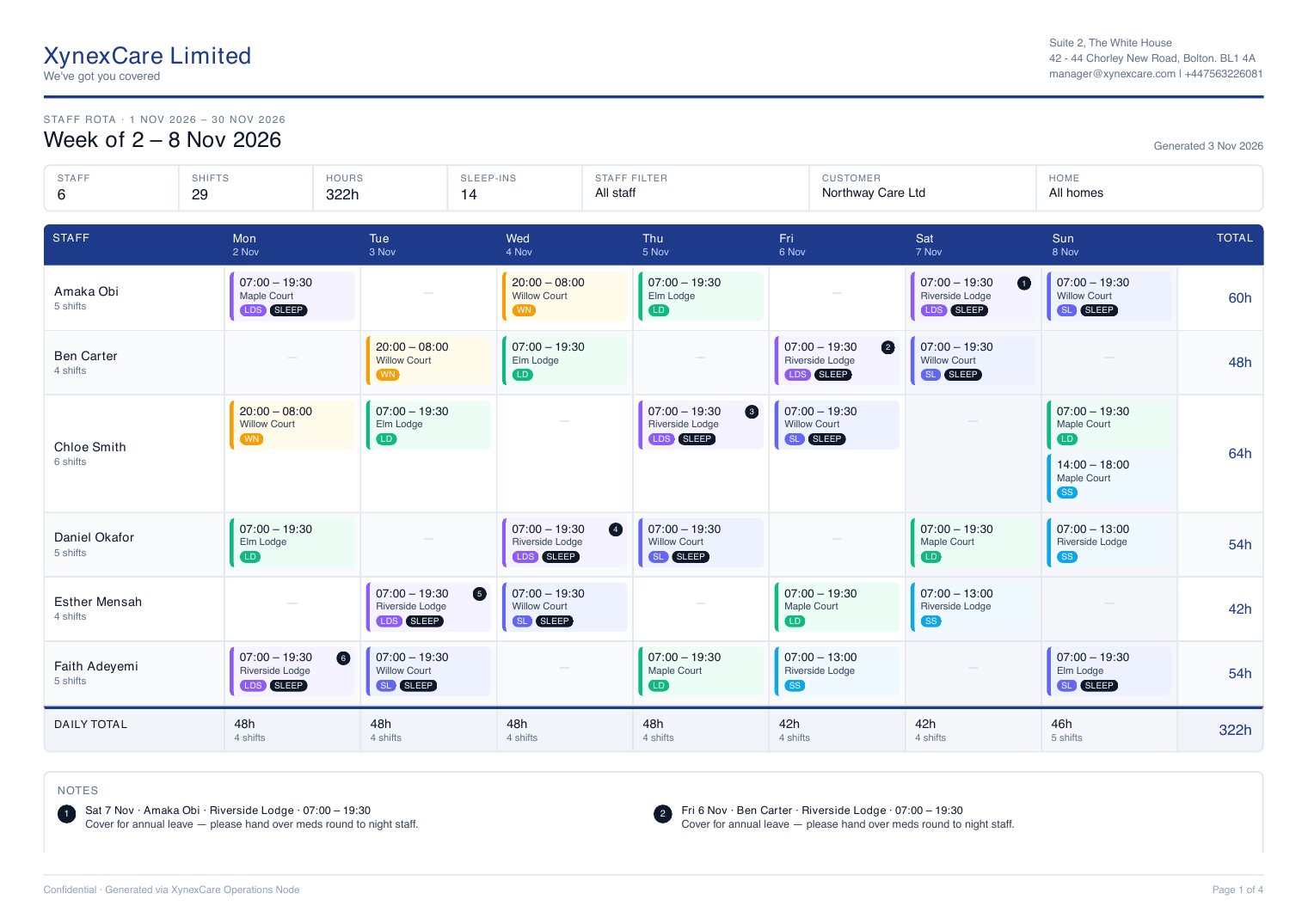
Read the grid
Each page is one week, Monday to Sunday.- Header - The week, plus totals for staff, shifts, hours and sleep-ins, and the filters you used
- Rows - One per staff member, with their number of shifts that week
- Shift cards - The time, home and shift type. The coloured edge shows the type and SLEEP marks a sleep-in.
- Total - Each person’s hours for the week
- Daily total - Hours and shifts for each day
Weeks with no shifts are left out. If nothing matches your filters, you’ll see a single page saying there are no rotas for the period.
Print or save as PDF
Use the toolbar at the top of the preview to print, download or zoom.Download as Excel
Click the round button at the bottom right of the preview. You get a file named likeRota_2026-11-01_2026-11-30.xlsx with:
- One sheet per week - The same grid as the preview, colour-coded by shift type, with totals and notes
- Shift list - Every shift in one table with date, staff, home, customer, shift type, time, hours, sleep-in and notes. Use the filter arrows in the header row to sort and filter it.